
Why do I need a Media Kit?
What to Include and How to Build One
Learn why creators need a media kit, what brands expect to see, and how Beacons builds yours automatically from your connected social accounts — free to start.
Quick answer: A media kit is a one-page digital resume that shows brands your audience, engagement, and past partnerships in one place, so they can decide whether to work with you in under a minute. Unlike a static PDF, slide deck, or Canva template, Beacons builds yours directly inside your existing Link-in-Bio page and pulls live stats from your connected social accounts, so you're not manually re-exporting a new version every time your following changes. It's free to start, and brands can view it, request a deal, or unlock gated sections all from the same link you already share.
What Brands Expect to See in a Media Kit
Section | What it covers |
|---|---|
Intro / Bio | Who you are, your niche, and your content style |
Audience | Follower counts, demographics, and top locations across platforms |
Performance | Engagement rate, average views, and reach |
Content examples | A few pieces that represent your best work |
Past brand work | Logos, testimonials, and results from previous collaborations |
Rates / services | What you offer and, optionally, your pricing |
Contact | How a brand reaches you or requests a deal |
So, what is a media kit and why does it matter as a creator? 🤔
A media kit is a digital portfolio that tells brands what they need to know about you and why they should work with you. It's your pitch — the chance to show your influence and back it up with real numbers. You'll want one for almost any business conversation, whether a brand reaches out to you or you reach out to them.
Media kits specifically highlight:
Who you are as a creator
Analytics and stats from your social accounts
Your rates
Details on past brand partnerships
You probably already have what a brand is looking for — you just need to show it clearly
Source | Quote |
|---|---|
"You don't need a six-digit following to land a great collab. Micro-influencers (10,000–50,000 followers) and nano-influencers (5,000–10,000 followers) typically have very high engagement, which is often what brands are looking for." | |
"A media kit lets you control your message — if you don't provide enough information about yourself, brands will make assumptions. It lets you present yourself the way you want to be seen." |
How do I actually make a media kit?
You've got two paths: build one inside a tool you already use, or build one from scratch with a design tool.
If you already have a Beacons Link-in-Bio page: your media kit lives right inside it. Connect at least one social account and you're ready to start customizing — see How to Create your Media Kit for the exact steps.
If you're building one from scratch: tools like Canva, Google Slides, or Notion offer free templates, but you'll need to manually update your stats yourself every time they change.
How do I use my media kit when reaching out to a brand?
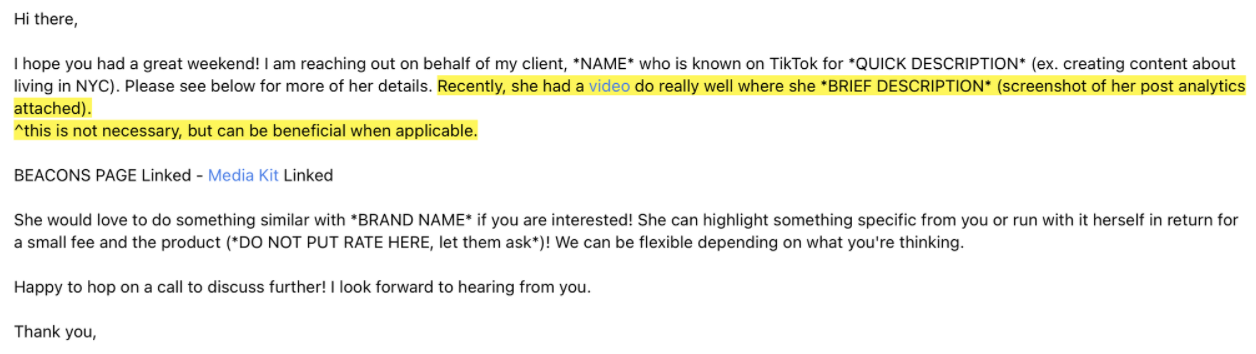
Find the brand's email or social DMs and send a short, professional message about why you're a fan and why you'd be a strong partner:
Share your engagement rates, audience demographics, and what makes you different
Point to specific past collaborations that performed well — exact view counts or engagement numbers a brand called out
Make a clear, respectful case for why you're the right fit
How do I use my media kit during rate negotiations?
If a brand offers a rate and you believe you're worth more, back that up with specifics:
Your engagement rates and audience demographics
Specific past collaborations that overperformed, with real numbers
A clear, respectful case for the rate you're asking for
Is a Beacons media kit really auto-updating?
Yes — once you connect your social accounts, your stats refresh automatically, so you're not manually editing a PDF or slide deck every time your following changes. Auto-updating stats aren't unique to Beacons; a few dedicated media-kit tools also offer this. What's different about Beacons' version is that it's built directly into the Link-in-Bio page you're likely already using — not a separate tool or subscription — alongside your links, store, and email tools.
Beacons Media Kit Features:
Free: the core media kit — connecting socials, customizing sections, and sharing your link — is included with your Beacons account at no cost. A custom domain for your media kit is a Pro feature; everything else is free.
Customizable: show or hide specific stats, and highlight past examples of content and partnerships
Gated access: require an email, a brand deal request, or a password before someone can view it — see Media Kit Permissions for all the options
Shareable as one link: send it in an email, a DM, or an application form, the same way you'd share your page
Some real examples: thatgeekfamily, ethan_pptart
FAQ
Do I need a large following to benefit from a media kit?
No — micro-influencers (10,000–50,000 followers) and nano-influencers (5,000–10,000 followers) often have higher engagement rates than larger accounts, which is frequently what brands are actually looking for. A media kit is what surfaces that, regardless of follower count.
Can I control who sees parts of my media kit?
Yes. Beacons lets you gate sections behind an email address, a brand deal request, a password, or an approved-accounts-only list — see Media Kit Permissions for the full breakdown.
Do I need a Beacons Link-in-Bio page to use the media kit feature?
Yes — the media kit is part of your Beacons account and lives inside your existing page. If you're not on Beacons, general-purpose tools like Canva or Notion can still get you a media kit, just without the auto-updating stats or built-in gating.
Does a media kit need to include pricing?
No — many creators leave rates out so they can tailor a quote to the specific campaign, usage rights, and deliverables instead.
Does it cost anything to use Beacons' media kit?
The core media kit is free and included with your Beacons account — connecting your socials, customizing sections, and sharing your link all cost nothing. The one paid feature is a custom domain for your media kit, which requires a Pro plan.
Still stuck? Email us at support@beacons.ai.